Deck format rules by game
Official format rules and how Odhinbox validates your decks.
Each TCG has its own official formats with different deck sizes, copy limits, sideboard rules, and card pools. Odhinbox documents every supported format and runs the same checks when you validate a deck.
Open the full format guide for detailed rules per format — Standard, Modern, Commander, Limited, digital Arena formats, and more. Format guides for every other supported game are available on the format documentation page.
View full format guideOrganize your collection with folders and lists
Learn how folders and lists work together to keep singles, trades, and wishlists under control.
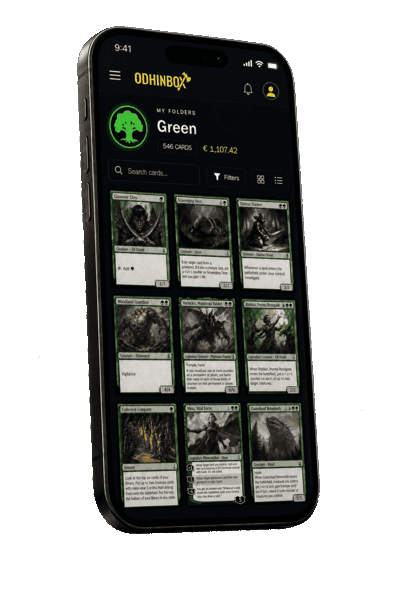
Folders are the backbone of your Odhinbox collection. Each folder belongs to a single trading card game and can hold hundreds of cards with conditions, languages, foil status, purchase data, and notes. Most collectors start with one folder per game and split later by format, set, or purpose.
Lists complement folders when you need a focused view: wishlists, cards for sale, trade binders, or set-completion trackers. A card can live in a folder and appear on multiple lists without duplicating inventory. That makes it easy to answer questions like “what am I still missing from this set?” or “which cards am I willing to trade?”
Use clear names and avatars for each folder and list so you can recognize them quickly on mobile. Default folders and lists can be configured in your profile settings, which speeds up adding cards from search results. If you upgrade to a paid plan, you unlock higher limits and advanced stats that help you understand value and completion across your collection.
Build and share Commander decks
Create EDH decks, track color identity, and publish builds for the community.
Decks in Odhinbox are more than a simple card list. For Magic: The Gathering you can set format, archetype, tags, and a featured card that represents the build visually in the public directory. Commander decks show color identity and mana curve insights so you can refine mana bases and ramp packages.
The deck builder lets you pull cards from your folders and lists, filter by color and type, and move cards between mainboard and sideboard. When you are happy with a list, you can share it publicly so other players can browse it on the Discover page or in the Community Decks section.
Public decks support likes, views, and tags, which helps your builds surface in discovery feeds. If you prefer to keep a brew private, leave it unlisted and iterate until you are ready. Trading Commander lists — decks built around swapping staples — are highlighted on the home page to connect collectors who want to trade in person or online.
Search cards and add them quickly
Use the TCG browser to find any card and send it to your collection in a few clicks.
The card database covers every supported trading card game with powerful filters: set, rarity, color, type, language, and text search. Each card page shows images, rules text, legality where applicable, and links to add the card directly to a folder, list, or deck.
Logged-in users benefit from default purchase settings (condition, language, seller, date) so repetitive data entry is minimized. The mobile app adds camera-based scanning for faster intake at events or when sorting bulk.
Search is also the entry point for discovering prices and collection statistics on paid plans. Even on the free tier you can explore the full card index and build meaningful lists — the platform is designed to stay useful before you upgrade.
Explore public decks and lists
Browse community builds, filter by TCG and format, and get inspiration for your next project.
The Community Decks and Community Lists pages aggregate public content shared by Odhinbox users. You can filter by TCG, format, archetype, list type, and text search. Each entry shows the owner, featured art, tags, and engagement stats so you can find active creators and popular builds.
The Discover home page highlights recent and most-liked decks and lists, popular tags, and frequently used cards across the community. It is the best starting point when you want inspiration for a new Commander shell, a trade package, or a set-completion list.
You do not need an account to browse public content. Creating a free account unlocks the ability to save favorites, publish your own decks, and sync collections across devices.
Choose the right plan for your collection
Compare Free, Premium, and Elite features before you upgrade.
The Free plan includes core collection tools: folders, lists, decks, card search, and public sharing within generous per-TCG limits. It is ideal for players who want a structured digital binder without a subscription.
Premium removes ads, raises folder/list/deck limits, and unlocks deeper statistics, price insights, and bulk actions that save time when managing large collections. Elite extends those limits further for vendors, content creators, and collectors with thousands of cards.
You can compare plans on the pricing page and upgrade from your profile when you are ready. All paid plans are optional — Odhinbox is built to remain useful on the free tier, with upgrades focused on convenience and scale rather than locking basic organization behind a paywall.